How Secure is My Password? The Ultimate Guide to Free Password Strength Checkers
Hello and welcome , This side your friend Shailesh .Today in this post we are talking about free password strength checker . We all have that one “universal password” we’ve been using since 2015.
You know exactly which one I’m talking about—maybe it’s your pet’s name followed by 123, or your birth year with an exclamation mark at the end.
It’s easy to remember, it works everywhere, and it saves you from clicking that annoying “Forgot Password” button every week.
But as the old saying goes, “Complacency is the enemy of security.”
We live in an era where we lock our front doors with heavy steel bolts but lock our entire digital lives—our bank accounts, personal photos, and work emails—with a password that a smart computer can guess in less time than it takes to blink.
If you want to know how safe your digital identity really is, you need to test my password strength.
Let’s talk about why your current password might be a ticking time bomb, how an online password checker works, and how you can fix your security without losing your mind.
The Scary Truth: How Modern Hackers Guess Your Password
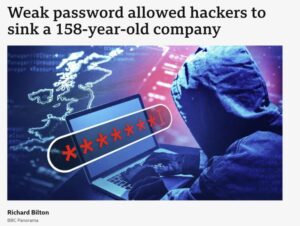
A lot of people think that a hacker is some guy in a dark hoodie typing furiously into a black screen trying to guess their specific password. I wish that were true.
In reality, modern hackers use automated software, scripts, and even smart AI tools that do the heavy lifting for them.
They perform what’s called a “brute-force attack.” This basically means their software tries millions of different combinations of letters, numbers, and symbols every single second until it finds the right key to your lock.
If your password is short or uses common words, their software will crack it instantly. It’s like leaving your house keys under the doormat—everyone knows exactly where to look!
How Does a Password Strength Meter Actually Work?
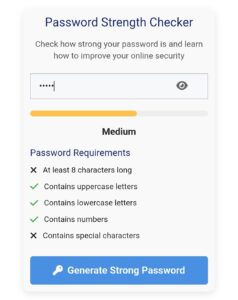
When you type a potential password into a secure password checker, you usually see a little colored bar change from red to yellow, and finally to green.
But what is happening behind the scenes?
The tool evaluates your input based on a few mathematical rules of randomness (often called entropy).
Specifically, a good password strength meter looks for four critical pillars:
- Length: How many characters are in it? (Spoiler: Size matters a lot here!)
- Character Variety: Does it include uppercase letters (A-Z), lowercase letters (a-z), numbers (0-9), and special symbols (like @, #, $, %)?
- Unpredictability: Is it a dictionary word or a predictable pattern like qwerty or 12345?
If your password passes all these checks with flying colors, the meter turns bright green, signaling that a hacker’s software would take years—sometimes even centuries—to crack it.
The Golden Rules of Creating a Bulletproof Password
Creating a strong password doesn’t mean you have to invent something completely impossible to remember like Xy$9!pQ#2mZ. In fact, if you can’t remember it, you’ll just end up writing it on a sticky note attached to your monitor, which completely defeats the purpose!
Instead, use these real-world tips to make your passwords uncrackable:
- Length Wins the Game: A longer password made of simple words is much stronger than a short password filled with complex symbols.
- Use Passphrases: Instead of a single word, think of a random, funny phrase or a sentence that only makes sense to you. For example: ILoveColdPizzaOnSundays!@ is incredibly long, incredibly strong, and very easy for a human to remember, but impossible for a hacking bot to guess.
- Stop Reusing Passwords: If a hacker manages to breach a small, insecure website where you used your universal password, the very first thing they will do is try that exact same email and password combination on Amazon, Google, and PayPal. Don’t put all your eggs in one basket!
Is it Safe to Type My Real Password Into an Online Tool?
This is a massive concern, and honestly, it’s a very smart question to ask. You shouldn’t blindly trust random websites with your sensitive information.
The good news is that well-designed privacy-focused tools run entirely inside your own web browser using client-side JavaScript. This means that when you type something into the input field, the calculation happens locally on your computer or phone. Your data is never sent over the internet, never saved on a distant database, and never seen by anyone else.
Pro-Tip: If you are still feeling extra cautious, you don’t have to type your exact password. Just type something that follows the exact same pattern and length to get an accurate reading of its strength!
Step-by-Step: Check Your Security for Free Right Now
Ready to find out if your password is a solid brick wall or a fragile glass window? You can check it completely for free in less than ten seconds.
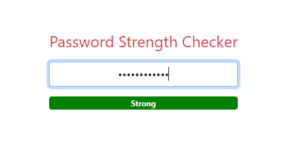
I highly recommend using the free password strength checker tool over at toolist.xyz. It features a fast, clean, and interactive online password checker that gives you instant feedback without any annoying sign-ups or hidden fees.
Here is how simple it is to use:
- Open your browser and navigate to toolist.xyz.
- Locate their free Password Strength Checker tool.
- Start typing a variation of your favorite password into the box.
- Watch the dynamic meter change colors. If it stays red or yellow, follow the tool’s smart suggestions to add more characters or symbols until it hits a secure green status.
Better Safe Than Sorry
At the end of the day, spending two minutes today updating your weak credentials can save you from months of stress, financial loss, and regret down the road. As they say, “An ounce of prevention is worth a pound of cure.”
Don’t take unnecessary risks with your digital accounts. Head over to toolist.xyz right now, give your passwords a quick health check, and make sure your private information stays exactly where it belongs—private!
You can check our other tools also like password generator tool and many more .
Thank you 🙏